New Users
Instructions
- For new users, follow these steps:
Account
Register new account.
Create available username.
Create strong password with atleast 12 character.
Start Game
Select available level of the cipher/decipher problem from the game.
Press
startto initiate the game.
Game Play
After pressing the
startbutton, two different gameplay UI (User Interfaces) appear.
The GUI on the right handside consisted features of showing the task description to solve the current level of Cipher/Decipher problems. And features of menubar showing the various available navigation pages for the users to go.
The CLI on the left handside consisted features of user input in the form of command line interfaces. The user input will be used to input the answer from the Cipher/Decipher problems. There are command specific Syntax which the user can input into the CLI.
Completing Game
After completing the task, the users will be shown a popup of
continueandquit gamebutton.
press
continueif users want to continue into different set of task in different Level.press
quit gameif users want to finish the game and returning back to the homepage.
Snap Shot!
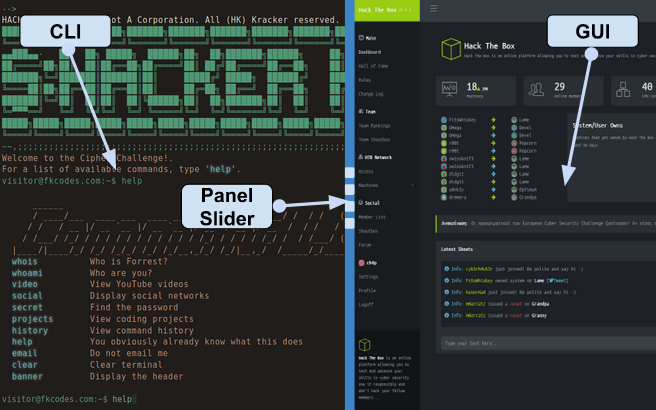
Note
The snapshot of gameplay UI shown above is just and illustration and not finalised. This project is under active development and will have substantial changes in the future.